Ribbons and Skulls
 Tickled By
♥Missy♥
Tickled By
♥Missy♥

This tutorial was written for those
that have a working knowledge of PSP.
Supplies Needed:
PSP 9 (any version will work)
Tube of choice
I used artwork by Barbara Jensen
If you would like to use her artwork please visit here
Tag template 2 by Melissa - you can grab it here Thanks Melissa!!
Bow of choice - I am using the one from Yvette's Girlz Rock kit over at Misfits Scrapz
2 papers of choice - pink and black - I used a pink one from my Glitter My Fancy kit
The black one I used was from Kristins Rock Revolution kit
Mask 185 by Vix Thanks hun!
Texture by Two Beats (Supplied)
Font of choice - I am using 'Roeland Rob' and 'FFF Urban'
Ribbon of choice
Filter used - 'Eye candy 4000 -Gradient Glow' 'MuRas Meister - Copies' and 'Penta.com - Jeans
Supplies here
Lets get started
Open up your supplies and minimize for now all except the tag template
Image-canvas size-change the width and height to 700 x 700-click ok
New raster layer-flood fill white-move this layer to the bottom
Select the small rectangle layer-selections-select all-float-defloat
Maximize the texture supplied-resize it so its just abit larger than the small rectangle
Copy and paste this onto your canvas-selections-invert-hit delete
Do not deselect yet-copy and paste your tube of choice-arrange over the texture left of the rectangle
Hit delete-paste your tube again-arrange in the center of the rectangle-hit delete
Paste the tube once more-arrange to the right of the rectangle-hit delete
Selections-select none-close off all the layers all except the tube layers
Merge visible the tubes-un X all your layers
Select the texture layer-colorize with a colour from your tube
Select the merged tube layer-change the blend mode to Luminance (L)
Duplicate this layer-on the duplicated layer-adjust-blur-gaussian blur-radius 3.00-click ok
Change the blend mode to multiply
Effects-plugins-penta.com-jeans-using the following settings
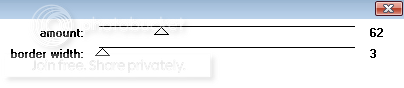
Click ok
Select the small rectangle frame layer-selections-select all-float-defloat
New raster layer-flood fill this with a colour from your tube
Selections-select none-drop shadow 0, 0, 60, 12.83 black
Select the large rectangle layer-selections-select all-float-defloat
Using a pink paper of choice-copy and paste this over the selected rectangle
Selections-invert-hit delete-close off the original rectangle layer
Repeat the above for the bottom rectangle layers-using a black paper of choice
Drop shadow as above-close off the original bottom rectangle layer
Using a font of choice-a pixel one will work best-I am using FFF Urban
Type out the words 'Ribbons and Skulls' in a colour of choice
Convert to raster-effects-plugins-MuRas Meister - Copies-using the following settings
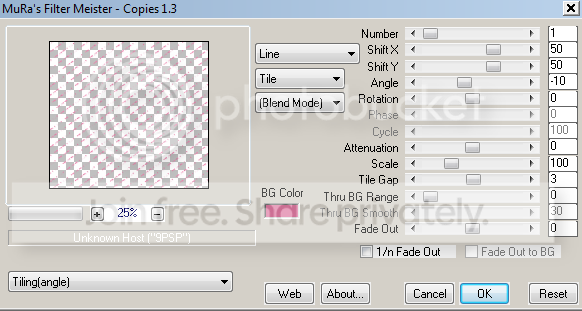
Click ok-arrange over the pink papered rectangle
Select the rectangle-selections-select all-float-defloat
Selections-invert-select the text layer-hit delete-selections-select none
Select the pink papered rectangle layer again-add the filter eye candy 4000 - gradient glow
Using the following settings
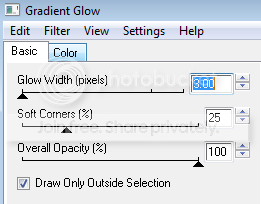
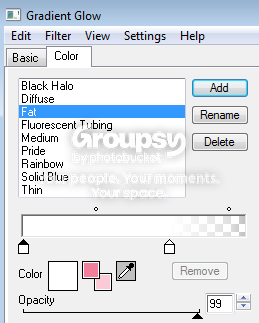
Drop shadow 0, 0, 60, 12.83 black
Add above drop shadow to the wordart layer
Add a ribbon and bow of choice if desired-see above tag for placement
Repeating above drop shadow
Erase one of the skulls from the template if desired
Copy and paste your tube of choice-arrange in the center of the tag
Add gradient glow to the tube using the same settings as above
Drop shadow 0, 0, 40, 10.26 black
New blank canvas 550 x 550 flood fill with a pink colour
Layers-new mask layer-from image-look for the mask Vix_Mask185-click ok
Merge group then copy and paste over to your tag-move this layer above the white background layer
Arrange to the left of your tag-repeat the above but flood fill with black then arrange that to the right of your tag
Add your name to your tag-arrange at the bottom of your tag-rotate left by 15.00
Add the same gradient glow settings as above-drop shadow 0, 0, 40, 10.26 black
Crop and resize if needed
Add proper copyright info then save as .png
Thanks for trying my tutorial. I hope you have enjoyed it
This tutorial was written on 16th March 2009.
The concept of the tutorial is copyrighted.
Feel free to link to the tutorial and or print out for your personal use.
But please do not copy it in any way to put online, pass out, or rewrite without permission.
The image you create using this tutorial is for you do to as you wish except for monetary gain or for merchandising.
©Just T!ckled P!nk 2007-2011. Any resemblance to another tutorial is purely coincidental.
Proud member of TWI
 Labels:
Ribbons and skulls
Labels:
Ribbons and skulls
Subscribe to:
Post Comments (Atom)
-♥-My TOU-♥-
All of my tutorials are copyrighted.
Feel free to link to the tutorial in your groups and or print out for your personal use.
But please do not copy it in any way to put online, pass out, or rewrite without permission.
The image you create using this tutorial is for you do to as you wish except for monetary gain or for merchandising. However, just because you did my tutorials that does not give you the right to go and tut your results. Unfortunately that has happened to me. Tut writers please do not use my exact settings in your tutorials please make up your own :)
By staying on my blog and doing my tutorials you are agreeing to my TOU.
©Just T!ckled P!nk 2007-2011. Any resemblance to another tutorial is purely coincidental.


0 comments:
Post a Comment